Matt Doherty
A few months ago I made the argument that you might not need an rdb: no stinking rdbs! I showed that mapped data on disk is essentially as fast as in-memory. The rdb’s only real advantage is the index, not the memory. If all data is in one place, rather than split between different processes managing disk and memory, architectures can become a lot simpler and more scalable.
The pack
I promised I’d follow up with details of how to set up a simple no-rdb architecture with TorQ, and, as promised, here it is: the TorQ no-rdb Starter Pack. It’s runnable out of the box, building on top of TorQ, with the README covering how to get started (as well as an overview with benchmarks etc.).

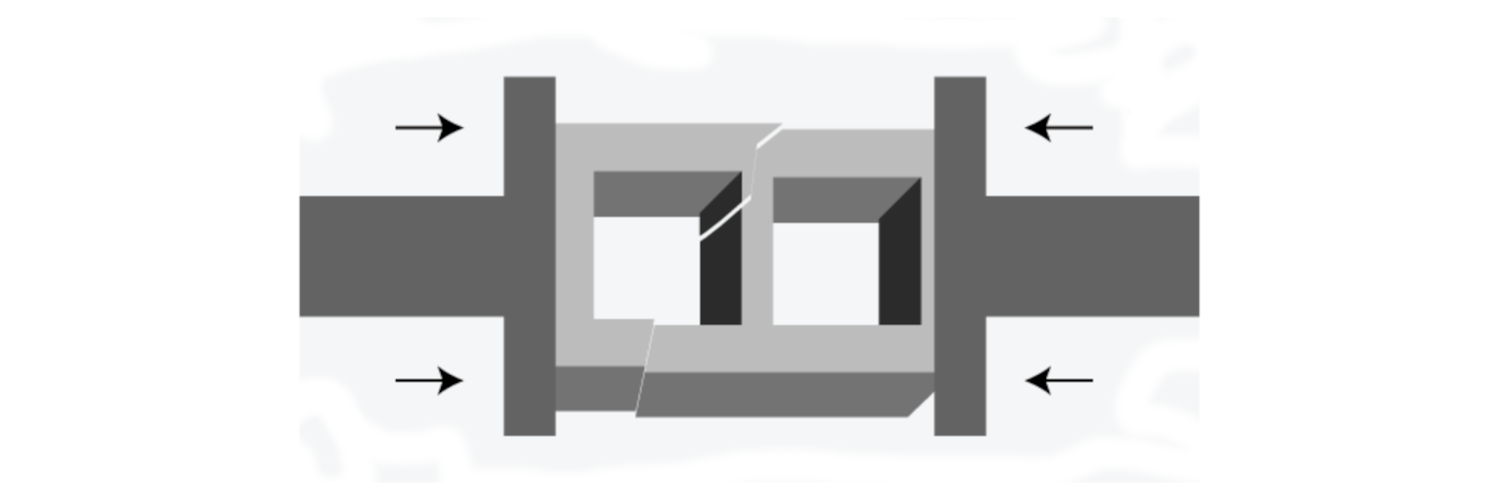
This diagram is from the previous blog post. The new TorQ pack is that diagram. A feed publishes to a tickerplant. A wdb writes today’s partition to disk in real time. Any number of identical db processes memory-map that database and serve queries. There’s no rdb, no separate hdb, no end-of-day move, and no gateway, because there’s no split to stitch back together.
The whole architecture comes down to one line of configuration:
savedir:hdbdir:hsym `$getenv[`KDBDB]
The wdb’s save directory and the historical database directory are the same directory. Everything else follows from that.
- There’s nothing to move at end of day because we’re already writing into the shared db folder (traditional hdb). The wdb flushes on a short timer (1s by default), so the dbs are never more than about a second behind live by default (and this can be reduced)
- There’s no “query the rdb for today and the hdb for the rest” because there’s one database containing both.
- And because it’s on disk, N processes can map it simultaneously and share one kernel page cache between them, instead of each holding its own copy of the day.
The benchmarks reproduce
You can also now easily reproduce all the benchmark results in the previous blog post for yourself, including a demonstration that the db process scales.
What makes it work
Two things had to be solved to make a single shared database practical, both of which I mentioned in the previous post.
Two read modes
By default, kdb+ memory-maps the partition files a query needs at query time, and releases them afterwards. Mapping is cheap but not free, and the cost grows with the number of partitions and columns each query touches. So each db runs in one of two modes:
- mapped (the default) — .Q.MAP[] maps the whole database once and keeps it mapped, so reads skip per-query mapping entirely.
- deferred — the stock behaviour: re-map per query. Simpler, nothing to keep in sync, but slower.
Both return identical results. On the benchmark’s single-day database, deferred costs 5–50% more per query. Least on compute-heavy aggregates where the mapping cost is lost in the work, most on cheap scans where it dominates.
End-of-day rollover
At end of day the live partition needs sorting and a p attribute applied, so that every previous day gets the fast lookups today’s can’t have. Normally that’s easy: hold queries at the gateway, or sort in place and move the result to a separate hdb directory. Neither option exists here. There’s no gateway to hold anything, and no hdb to move to: the dbs are serving the very partition being sorted, and an in-place sort would rewrite column files out from under live readers.
So the pack sorts a copy and swaps it into place instead. The cost of all this is one extra full copy of the day’s partition, so transiently around twice its disk. That’s the price of a zero-downtime rollover with no gateway.
Please try it!
The pack is on GitHub. It runs on the community edition, it stands up in about five minutes once you’ve got TorQ checked out, and the benchmarks reproduce with one command.
I said before that I wasn’t claiming this was the correct way to build a kdb+ system, only that it deserved more consideration. For many use cases this might be a better default, and it’s a much easier thing to consider when you can simply clone our pack and run a query against it!
If you try it and it breaks, or you benchmark it on real data and get different numbers, or you’d just like to chat or ask questions, let us know!
Share this: