Matt Doherty
kdb+ is famous for its dislike of loops (no stinking loops). As kdb+ developers we have a lot of flexibility in the architectures we can use, and today I’m going to try to convince you there’s something else we should remove from our systems: rdbs. No stinking rdbs!
In kdb+ land there are essentially two ways to store data: in-memory, and on-disk. The data itself is identical. This was a key insight that’s now quite common in the columnar data space (see Apache Arrow in particular), as it removes the need for serialization when moving data from one place to another, and enables memory mapping and very fast reads of data from disk. kdb+ supports a range of different architectures, but the standard or default model is still to use two main types of process together: real-time databases (rdbs) with the data fully in the process’s own memory space, and historical databases (hdbs) with the data serialized on disk and memory mapped into the processes memory space.
My opening is intentionally provocative and a little tongue in cheek. I don’t really believe we shouldn’t use rdbs at all. A major strength of kdb+ as a technology is its flexibility, and kdb-x promises to add even more. The argument I’ll make here is that rdbs should not be considered the default option in all kdb systems. They have always been one of the core process types in kdb, but I believe for many problems they may not be required, and you should at least consider not using them. The approach isn’t new, and is deployed in a number of installations and in some of KX’s own components in their Insights product, but the details around when and where it might be applicable isn’t always clear.
Why have an rdb?
Faster queries
Queries against data in memory are of course much faster, aren’t they? I put together a simple benchmark on fairly standard hardware with fairly standard data:
- a i7i.xlarge ec2 instance with 32GB of memory and fast NVMe SSD storage attached
- a single typical (relatively small) day of NYSE TAQ trade data. Roughly 50 million trades and 10GB on disk
- Comparing the performance of queries against in-memory data (rdb), on-disk data (hdb), and on-disk data when the cache is cold (hdb cold cache)
- With a small set of queries covering some typical workloads
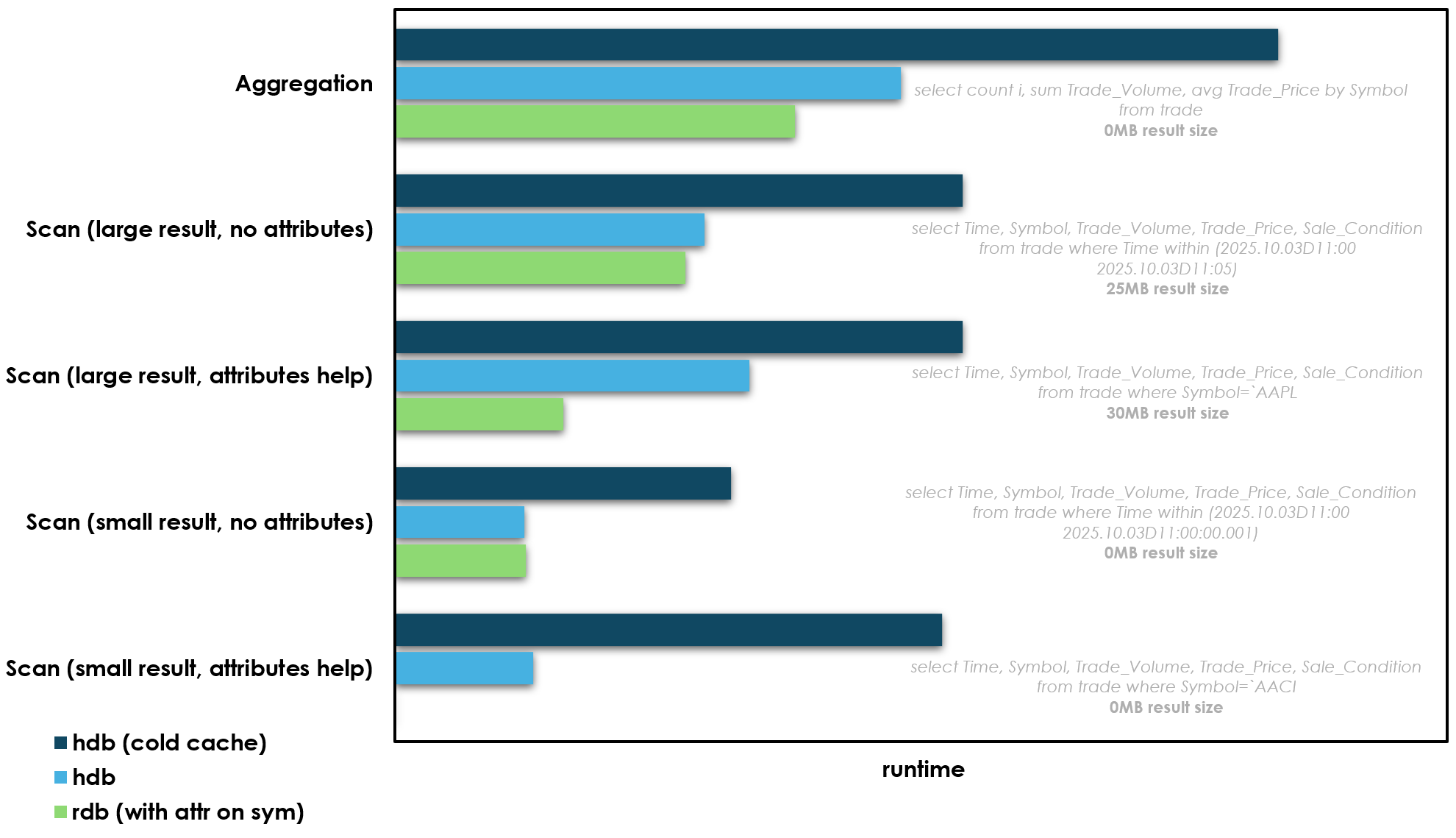
So the key piece of context before we talk more about these results, is that hdb processes often won’t actually to go all the way to disk to get their data. They memory map files on disk, and when accessed the OS will first check the page cache, and if a particular file exists in that cache it will not actually go to disk to get it. So in all of the hdb results above the query is hitting the page cache instead of disk i.e. the cache is warm. So when the cache is warm the hdb isn’t so different from the rdb: it’s data is in memory, but in the OS level page cache instead of the processes own memory space. I’ve also added a 3rd set of benchmarks when the cache is “cold”, so we can see the difference when the OS has to actually go to disk.
So what are the key takeaways from these benchmarks:
- Let’s not bury the lede here: in-memory is the fastest for all benchmarks
- If a query can use attributes and the result size is small in-memory data wins by a large margin over disk. The last query in particular is vastly faster when the data is in memory and has attributes. These queries are effectively lookups on a hash map, and so O(1) and very fast. We can add attributes to data on disk too, but on disk attributes are not appendable in kdb+ so we can’t maintain them. I’ll come back to this point later.
- If the query does not use attributes, or it does but the result size is larger, the performance gap between the rdb and hdb is small. Depending on the query it hovers between 0-20%. This small difference likely comes from minor page faults and TLB pressure and other technical stuff when accessing the page cache that it’s not worth worrying about too much. The data in memory in the OS page cache is not quite as fast as data in the rdbs heap, but it’s close. The aggregation and large scan (with attributes on filter) comparisons above are maybe the most interesting: both of these queries benefit from attributes, but the hdb without attributes is still not far behind, as the query still has to access a lot of data so the attribute benefit is much less. So really an hdb can be thought of as another type of in-memory database, with the memory in a shared space: the OS page cache
- Even when a query has to go all the way to disk, the difference in speed is still not enormous. We’re talking 2x at worst. This is where modern NVMe SSDs make a massive difference. On spinning disk this difference would be much much larger.
Keep up with inserts
As well as reading data, we also have to be able to add new data. New trades flow in during the day and we need to be able to add them. Here is another benchmark comparing the two setups:

The in-memory process has a more clear-cut advantage here. But it’s perhaps not as large as you might expect. It’s certainly much smaller than when your storage was slow spinning disks. And another crucial point here: inserts into memory are a serial process. When an rdb is inserting new data it cannot serve queries simultaneously. This is not true in the later case, we can insert to a splayed table on disk and at the same time processes can serve queries on the data. Compute and memory are separated.
Why not have an rdb?
Faster queries
I know above I showed that the rdb is (ever so slightly) faster, but that’s for one query. What if you have 2, or 10? On an rdb you’re stuck running queries serially. It cannot run queries concurrently. However if your data is shared on disk (and in memory via the OS page cache) you can go parallel. Each individual query might take slightly longer, but you can run all 10 at once on separate processes. A query that is 10% slower on an hdb, becomes 45% faster if you need to run it twice as you can go parallel e.g. two queries at 110ms each running in parallel taking 110ms total vs two queries at 100ms serially taking 200ms. This is also a big architectural advantage if you want to support different types of use-case on the same system. For example research queries, and more latency sensitive trading queries, without them getting in each others way.
All memory is shared by default
We can shard and scale basically for free. rdbs have a fixed memory cost, if we want more processes we need more memory, and new processes are slow to startup as they need to read all current data into memory. When your data is only stored once, on disk and in the OS page cache, you can have 10 processes on top of it, or why not 100? These processes can startup almost instantly. This fundamentally separates memory and compute
No gateways
You can of course still have gateway processes if you want, but you don’t need them to join rdb and hdb data together. It’s possible to have all your data accessible in one process. Users can spin up their own single process with access to all data, both live and historical.
Simpler architecture
There are some details to consider on reloading and mapping data on disk when it’s being appended to “live”, but on the whole you have fewer processes, and fewer process types. There’s no coordination problem between rdb and hdbs and gateways, so your system may well be simpler.
So let’s talk a little more about this…
Alternative default architecture
Standard kdb+ architecture is the way it is for a good reason. If you’re in a world where memory is much more expensive, and all of your non-volatile storage is spinning disks, it makes a lot more sense to split your database in two. Inserts against splayed tables on disk will be much slower than memory, likely several orders of magnitude, and any queries that do not hit the OS page cache (cold cache) will be drastically slower, again probably several orders of magnitude. But this is no longer the world we live in.
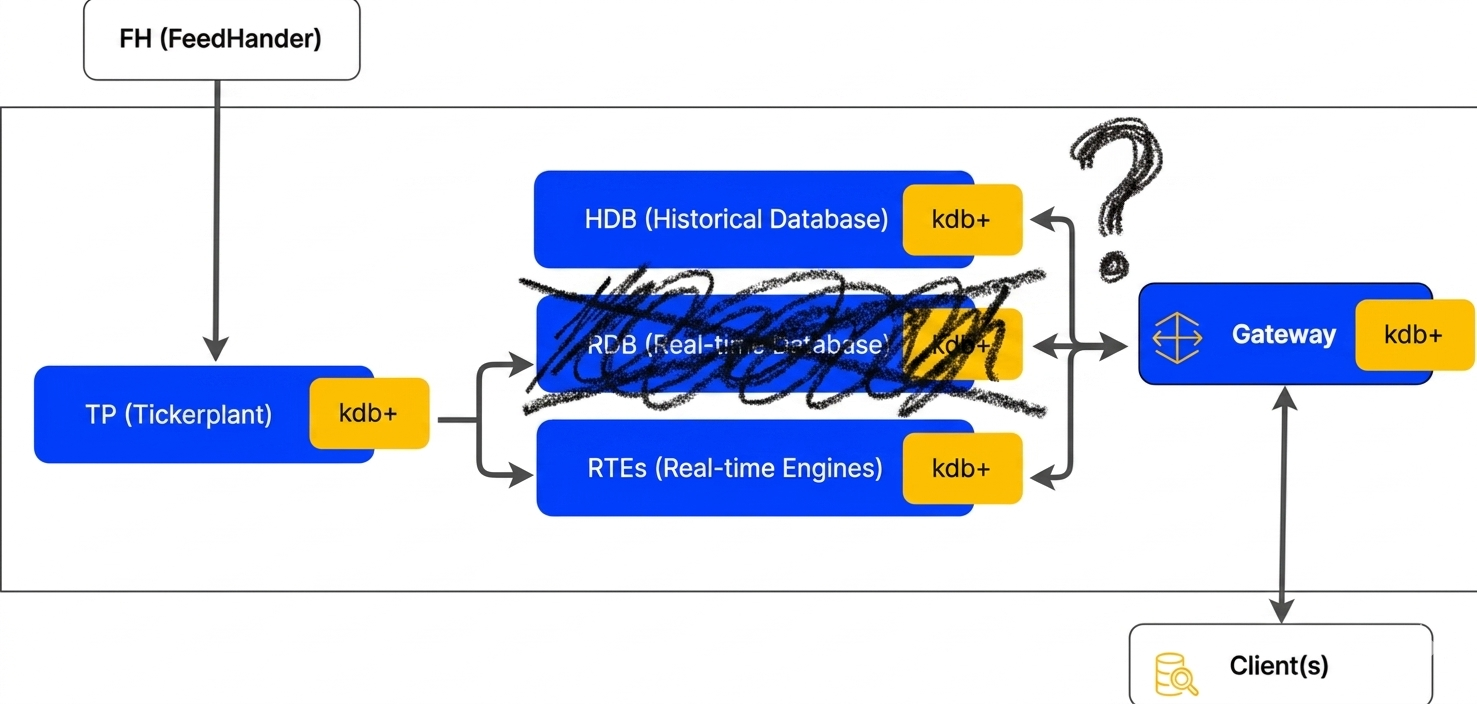
I’m proposing an alternate default architecture that looks more like this:

The tickerplant process is exactly the same as before, but all data goes straight to disk via “writer” processes (essentially TorQ wdb processes), and all data is read via database processes which mount the data on disk (TorQ hdbs).
Let me be clear here that this isn’t a revolutionary idea by any means. I’m sure there are kdb+ systems in operation today that have a similar architecture to this. My argument here is less that this is new, but rather that we should consider this alternative much more seriously and broadly.
Here’s a clearer picture showing how we have on-disk data separated into a “live partition” and all your standard historical data:
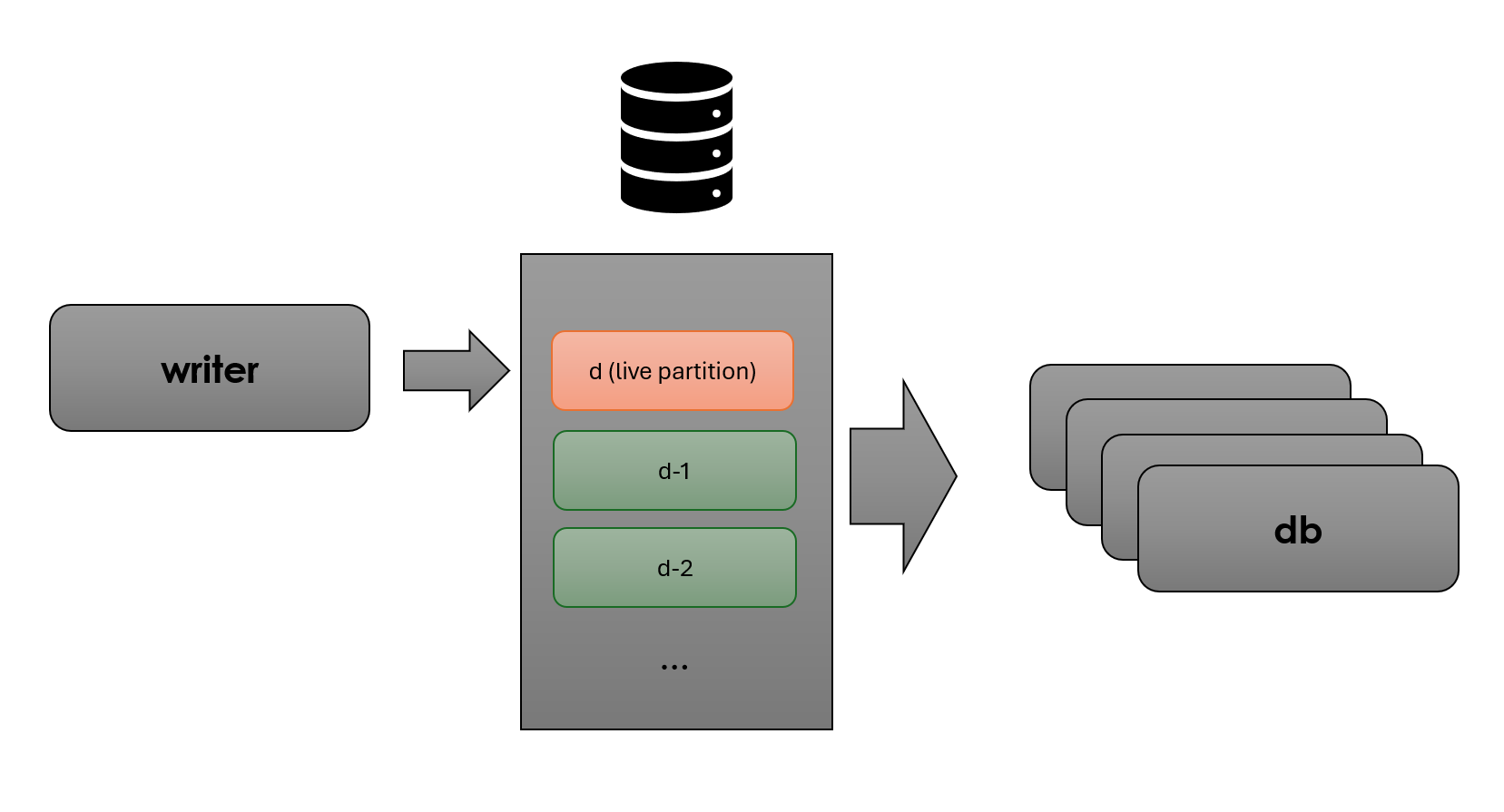
I believe this approach gives us a few significant advantages:
- It is simpler. Fewer processes fewer problems
- More flexible and scalable. Compute and memory are separated. If we need more database processes we can simply add them, they do not have direct memory overhead and they will spin up very quickly (unlike traditional rdbs). We’re effectively using the OS page cache as “free” memory management, and this is core battle tested OS code so it’s very solid.
- The data is in one place. If you need today and previous days data there’s no need to run two queries against two different processes and handle joining etc. All data is in one place
Of course everything in software engineering is trade-offs, and here the trade-offs we’re making are:
- Somewhat slower query performance compared to an rdb. As covered above the difference is a lot less than you might think, but there is a real difference.
- In the partition that is being live appended to we cannot have attributes. This means for certain “small lookup” type queries the performance difference is dramatic. However these queries may not be an important part of your workflow, or if you want the advantages above while keeping these types of queries fast, you can add dedicated cache processes for what you need i.e. add specialized caches based on need, rather than a large expensive general purpose cache process (i.e. the rdb)
There are also a few key technical considerations for “live append” databases (dbs, no need to call them hdb and rdb anymore):
- We want to lock the “live partition” into the OS page cache to make sure queries rarely/never have to go to disk. This will happen naturally if the data is used a lot as the OS will try to keep frequently accessed data in the cache. However, we can also use vmtouch or tmpfs (RAMdisk) to directly control this. So we can guarantee we always get the hot cache benchmark results above and never have to go to disk. This is relatively simple to setup.
- There is a coordination problem between the database processes and the symfiles (enumerations) and columns being live appended. This is not quite as bad as it seems. I believe the best way to solve this to use .Q.MAP to avoid mmap overhead on every query, and \l to reload the symfile and remap the latest data periodically. In principle this can be very fast (in my test setup above running \l takes 0.018ms), and we have a few options on how exactly to execute depending on the trade-offs between availability and speed we want to make in our system:
- if it’s cheap enough you can simply run this before any query
- or you can have the writer trigger a reload on all dbs on every insert so we only reload when there is new data
- or it can be timer based
- the symfile has to be kept small as we’ll be reloading it a lot. Although we can be smart about this, and reload it optimistically i.e. use the chksum to quickly see if it has changed, and only reload if required.
- we cannot have attributes in the “live” partition. Traditionally hdb partitions put a p attribute on the most commonly filtered column, which acts like an index for lookups. Attributes on disk in kdb+ are fundamentally not appendable, so we have to do without them. However we can still sort and add them as normal at rollover as data moves to history and out of the “live partition”
Based on the requirements of your specific system the architecture above can then be expanded with realtime engines and/or cache processes to calculate analytics (for example VWAPs, bars etc.). These values can then be published back into the tickerplant and read from the database processes, or accessed directly
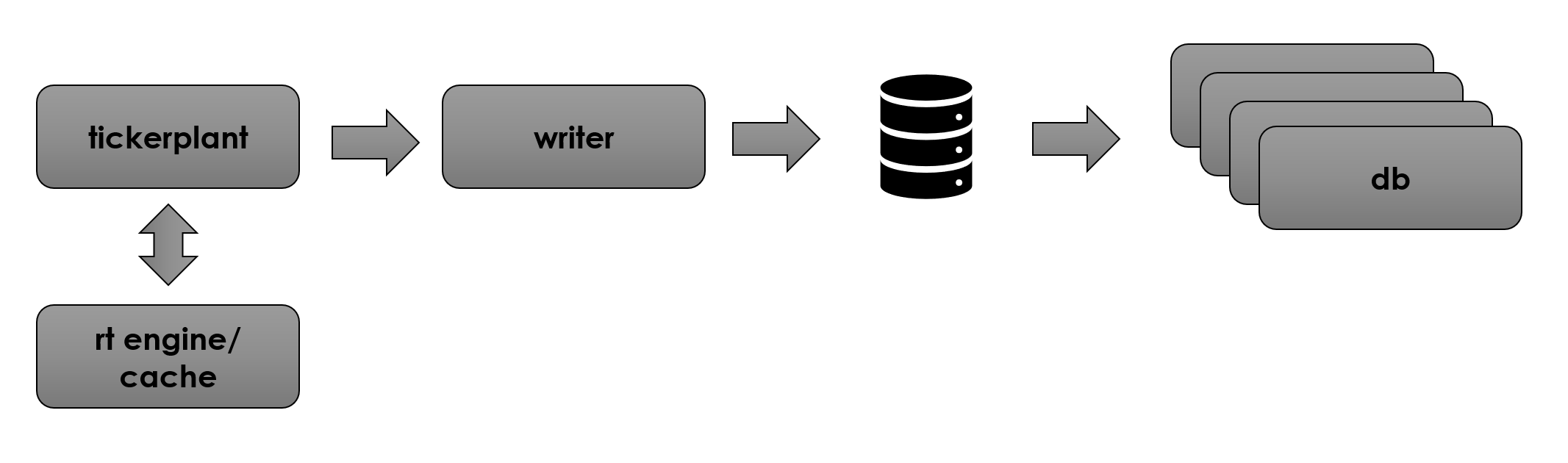
I don’t want to dwell too much on these technical details, so I’ll aim to follow up with details on how to setup this kind of architecture with TorQ:
- How to reload and remap data as quickly as possible
- Rollover
- Making it as easy as possible to setup and get going
I’m not one for long conclusions, but hopefully I’ve made you at least consider an alternate default architecture for kdb+. “no rdb” architectures can be simpler, more scalable and nearly as fast. I’m certainly not saying this is the “correct” way, simply that it’s something we should consider a little more strongly. If anyone else has thoughts or wants to discuss these ideas further we’re always happy to hear from you!
Share this: