Building a real-time market data pipeline on ClickHouse
Ciaran Corvan
Introduction
In one of our previous posts we gave an overview of ClickHouse: how it stores data, what makes it fast and some of the features it offers. This time we put some of those features to work and build something with them.
Capturing market data is one of the most common jobs in finance. A typical pipeline needs to subscribe to a feed, store every trade and quote, and produce summaries such as OHLCV (Open, High, Low, Close, and Volume) bars that analysts and applications can query quickly. It also needs to cope when the feed sends something unexpected.
Here we build a simple version of that pipeline entirely inside ClickHouse. We cover:
- choosing data types, codecs and a primary key suited to market data
- consuming trades and quotes directly from Kafka with the Kafka table engine
- building one-minute OHLCV bars with an incremental materialized view and
AggregatingMergeTree - catching malformed messages so they can be fixed and replayed
All the SQL is included, so you can follow along and adapt it to your own data.
Overview of the system
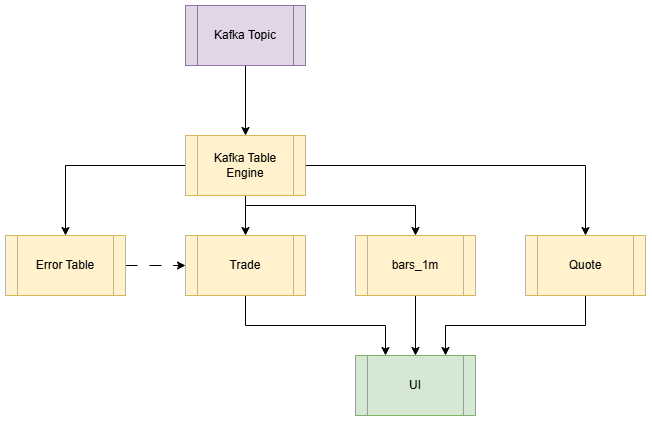
Here we are implementing a simple market data capture system. We use ClickHouse’s inbuilt Kafka table engine to act as a listener to a topic, then pump data into raw tables. We use materialized views to pre-calculate OHLCV bars using the AggregatingMergeTree table engine. We also use an error table to capture malformed data from the Kafka topic, so they can be repaired and re-inserted.
Schemas, Datatypes and the Primary Key
One of the most important considerations when defining a table in ClickHouse is the primary key. In ClickHouse it’s a sparse index that controls sort order and data skipping. Also, duplicate keys are allowed. A good primary key allows for the skipping of large chunks of data without needing to read any rows in the database directly. Putting the date first means a query for every symbol on one day reads one contiguous block, and a single symbol is still a narrow range within each day. For our case we have gone with the following:
CREATE OR REPLACE TABLE trades (
    time DateTime64(9) CODEC(Delta, ZSTD),
    sym LowCardinality(String),
    src LowCardinality(String),
    price Float64 CODEC(Gorilla, ZSTD),
    size UInt32 CODEC(T64, ZSTD),
    side Enum8('B' = 1, 'S' = 2),
    date  Date ALIAS toDate(time)
)
ENGINE = MergeTree
ORDER BY (toDate(time),sym,time)
CREATE OR REPLACE TABLE quotes (
time DateTime64(9) CODEC(Delta, ZSTD),
sym LowCardinality(String),
src LowCardinality(String),
bid Float64 CODEC(Gorilla, ZSTD),
ask Float64 CODEC(Gorilla, ZSTD),
bsize UInt32 CODEC(T64, ZSTD),
asize UInt32 CODEC(T64, ZSTD),
date Date ALIAS toDate(time)
)
ENGINE = MergeTree
ORDER BY (toDate(time),sym,time)
We are using the standard MergeTree
Market data has a predictable shape: a handful of symbols repeated millions of times, timestamps that only move forward, prices that change in small steps, and sizes that cluster on round lots. ClickHouse lets you pick a data type and a compression codec for each column optimising storage and query performance.
We use LowCardinality strings for sym and src. This applies dictionary encoding to the fields which improves performance when the dataset contains a high number of repeating values.
For time, sorted timestamps are close together, so Delta stores small differences that ZSTD compresses well.
Prices use Gorilla ZSTD as it is designed for slowly changing floats, like tick prices. Float64 keeps aggregations like VWAP fast.
For the size columns we use T64. This removes the high bits that small integers don’t use, and ZSTD then compresses the repeated round lots.
Side uses Enum8 to store each datapoint in one byte while still reading as ‘B’/’S’.
Finally for date we use ALIAS. This is not a stored column and it is computed from the time column. It is included in the schema for convenience.
The Kafka Table Engine
The Kafka table engine turns ClickHouse into a Kafka consumer: a Kafka table subscribes to a topic, and a materialized view writes each batch it reads into a MergeTree table, so data flows from the stream into queryable storage with no external connector.
-- Trades
CREATE TABLE trades_queue
(
    time  DateTime64(9),
    sym   String,
    src   String,
    side  Enum8('B' = 1, 'S' = 2),
    price Float64,
    size  UInt32
)
ENGINE = Kafka
SETTINGS
    kafka_broker_list = 'kafka:29092',
    kafka_topic_list  = 'market_data.trades',
    kafka_group_name  = 'ch_trades',
    kafka_format      = 'JSONEachRow',
    kafka_handle_error_mode  = 'stream';

CREATE MATERIALIZED VIEW trades_mv TO trades AS
SELECT time, sym, src, side, price, size
FROM trades_queue
WHERE _error = '';

-- Quotes
CREATE TABLE quotes_queue
(
    time  DateTime64(9),
    sym   String,
    src   String,
    bid   Float64,
    ask   Float64,
    bsize UInt32,
    asize UInt32
)
ENGINE = Kafka
SETTINGS
    kafka_broker_list = 'kafka:29092',
    kafka_topic_list  = 'market_data.quotes',
    kafka_group_name  = 'ch_quotes',
    kafka_format      = 'JSONEachRow',
    kafka_handle_error_mode  = 'stream';

CREATE MATERIALIZED VIEW quotes_mv TO quotes AS
SELECT time, sym, src, bid, ask, bsize, asize
FROM quotes_queue
WHERE _error = '';A potential concern with the Kafka table engine is the size and frequency of inserts. ClickHouse works best with fewer, larger inserts, around one insert per second with thousands of rows each. The Kafka engine batches messages for you. kafka_max_block_size caps how many messages go into one batch, and kafka_flush_interval_ms writes a partly filled batch after a timeout so a quiet feed isn’t held up.
Materialized Views
An incremental materialized view in ClickHouse works like an insert trigger: it runs its query on each new block of rows as it’s inserted into the source table and writes the result to a target table, so aggregates such as OHLCV bars are computed once at ingest instead of every time they’re queried.
First we start with the query we would like to materialize:
SELECT
    sym,
    toStartOfMinute(time)       AS minute,
    argMin(price, time)         AS open,
    max(price)                  AS high,
    min(price)                  AS low,
    argMax(price, time)         AS close,
    sum(size)                   AS volume,
    sum(price * size) / sum(size) AS vwap,
    count()                     AS trades
FROM trades
GROUP BY sym, minute
ORDER BY sym, minute;The query above computes one-minute bars from raw trades every time it runs. An incremental materialized view computes the bars once, as trades arrive, and stores them in a much smaller table.
To create an incremental materialized view, start with the target table:
CREATE TABLE bars_1m
(
    sym    LowCardinality(String),
    minute DateTime,
    date   Date ALIAS toDate(minute),
    open   AggregateFunction(argMin, Float64, DateTime64(9)),
    high   SimpleAggregateFunction(max, Float64),
    low    SimpleAggregateFunction(min, Float64),
    close  AggregateFunction(argMax, Float64, DateTime64(9)),
    volume SimpleAggregateFunction(sum, UInt64),
    vwap   AggregateFunction(avgWeighted, Float64, UInt32),
    trades SimpleAggregateFunction(sum, UInt64)
)
ENGINE = AggregatingMergeTree
ORDER BY (sym, minute);An incremental materialized view only sees the rows in each insert. It never looks at the whole table. Trades for a single minute often arrive across several Kafka batches, so the view can’t compute a finished bar. It only ever sees part of each minute.
Instead using an AggregatingMergeTree, the view stores a partial state for each minute: the working needed to finish the calculation later. ClickHouse combines these states as parts merge in the background, and you finish the calculation at query time.
As an example, suppose one minute’s trades arrive in two batches:
| Batch | Trades | VWAP of batch | State stored |
|---|---|---|---|
| 1 | 100 @ 10.00 | 10.00 | Σ(price × size) = 1,000, Σsize = 100 |
| 2 | 300 @ 11.00 | 11.00 | Σ(price × size) = 3,300, Σsize = 300 |
If we stored each batch’s VWAP and averaged them, we’d get (10.00 + 11.00) / 2 = 10.50, which is wrong. Merging the states instead gives (1,000 + 3,300) / (100 + 300) = 10.75, the same answer as if every trade had arrived in one batch.
Open and close work the same way. Their states keep the price together with its timestamp, so merging picks the earliest or latest trade across every batch.
For AggregatingMergeTree tables we use the following pattern:
-Statefunctions (argMinState,avgWeightedState) save the working when the view writes tobars_1m.-Mergefunctions (argMinMerge,avgWeightedMerge) combine the working and produce the final value at query time.
Values that combine without extra information, such as max, min and sum (the max of maxes is still the max), don’t need a state. They’re stored as plain values in SimpleAggregateFunction columns.
With that we go on to define our materialized view:
CREATE MATERIALIZED VIEW bars_1m_mv TO bars_1m AS
SELECT
    sym,
    toStartOfMinute(time)         AS minute,
    argMinState(price, time)      AS open,
    max(price)                    AS high,
    min(price)                    AS low,
    argMaxState(price, time)      AS close,
    sum(toUInt64(size))           AS volume,
    avgWeightedState(price, size) AS vwap,
    count()                       AS trades
FROM trades
GROUP BY sym, minute;At query time we use the -Merge functions. It may be confusing why we GROUP BY on an already aggregated table. This is because background merges are eventual, so a minute can still be spread across several rows.
SELECT
    sym,
    minute,
    argMinMerge(open)      AS open,
    max(high)              AS high,
    min(low)               AS low,
    argMaxMerge(close)     AS close,
    sum(volume)            AS volume,
    avgWeightedMerge(vwap) AS vwap,
    sum(trades)            AS trades
FROM bars_1m WHERE sym='AAPL'
GROUP BY sym, minute
ORDER BY sym, minuteA note on existing data
A materialized view only processes rows inserted after it’s created. If trades already holds data when you create the view, bars_1m won’t include it. To backfill, run the view’s SELECT once as an INSERT INTO bars_1m, limited to rows before the view was created so nothing is counted twice.
Handling Errors from Kafka
Recall the table definition for the Kafka table engines. In the settings we added an additional setting kafka_handle_error_mode = 'stream'. In this mode, messages that fail to parse populate two virtual columns called _raw_message and _error. These are empty for successfully parsed rows. This means all errors can be read with the filter WHERE _error != ''. This can then be captured in a materialized view:
CREATE TABLE market_data_errors
   (
       topic  LowCardinality(String),
       offset UInt64,
       raw    String,
       error  String
   )
   ENGINE = MergeTree
   ORDER BY (topic, offset);

   CREATE MATERIALIZED VIEW trades_errors_mv TO market_data_errors AS
   SELECT _topic AS topic, _offset AS offset, _raw_message AS raw, _error AS error
   FROM trades_queue WHERE _error != '';

   CREATE MATERIALIZED VIEW quotes_errors_mv TO market_data_errors AS
   SELECT _topic AS topic, _offset AS offset, _raw_message AS raw, _error AS error
FROM quotes_queue WHERE _error != '';From here failed messages can be investigated and potentially fixed before making their way into the relevant tables. Note this is one of the reasons we have a chain of materialized views from Kafka to trades to bars_1m. It means when we fix and insert into the trades table, this will populate the materialized view also, thus keeping both tables in sync.
An Example of Kafka Error Handling
Recall for the side column we used the datatype Enum8('B' = 1, 'S' = 2). Suppose the upstream system changed its message format without warning and the trade feed starts sending side as BUY/SELL instead of B/S.
Without kafka_handle_error_mode = 'stream' the consumer would stop at this message and the whole feed would stall. In stream mode, the message goes to market_data_errors and the rest of the feed keeps flowing.
We can find out exactly what went wrong by querying the error table
SELECT
        topic,
        offset,
        error, JSONExtractString(raw, 'side') AS side_sent
FROM market_data_errors;At which point the error column tells you what happened:
Unknown element 'BUY' for enum: (while reading the value of key side)
Next is to fix and reinsert, ClickHouse has a MultiIf that we can use:
INSERT INTO trades (time, sym, src, side, price, size)
SELECT
    parseDateTime64BestEffort(JSONExtractString(raw, 'time'), 9) AS time,
    JSONExtractString(raw, 'sym')                                AS sym,
    JSONExtractString(raw, 'src')                                AS src,
    multiIf(JSONExtractString(raw, 'side') = 'BUY',  'B',
            JSONExtractString(raw, 'side') = 'SELL', 'S',
            JSONExtractString(raw, 'side'))                      AS side,
    JSONExtractFloat(raw, 'price')                               AS price,
    JSONExtractUInt(raw, 'size')                                 AS size
FROM market_data_errors
WHERE topic = 'market_data.trades'
AND JSONExtractString(raw, 'side') IN ('BUY', 'SELL');If we are happy, then we can go ahead and delete the messages we have fixed:
DELETE FROM market_data_errors
WHERE topic = 'market_data.trades'
AND JSONExtractString(raw, 'side') IN ('BUY', 'SELL');Next in order to prevent this happening again we update the trades_queue Kafka table to accept the new values, as well as the original trades_mv:
CREATE TABLE trades_queue
(
    time  DateTime64(9),
    sym   String,
    src   String,
    side  Enum8('B' = 1, 'S' = 2, 'BUY' = 3, 'SELL' = 4),
    price Float64,
    size  UInt32
)
ENGINE = Kafka
SETTINGS
    kafka_broker_list       = 'kafka:29092',
    kafka_topic_list        = 'market_data.trades',
    kafka_group_name        = 'ch_trades',
    kafka_format            = 'JSONEachRow',
    kafka_handle_error_mode = 'stream';
CREATE MATERIALIZED VIEW trades_mv TO trades AS
SELECT
time,
sym,
src,
if(side IN ('B', 'BUY'), 'B', 'S') AS side,
price,
size
FROM trades_queue
WHERE _error = '';We can get away with an if statement because the enum guarantees side can only be one of the four values. Anything else never gets past parsing.
Rounding up
With a handful of tables and materialized views we have a working market data pipeline: trades and quotes flow in from Kafka, one-minute bars are computed as the data arrives, and bad messages are kept to one side rather than stopping the feed. All of it runs inside ClickHouse with no extra services to manage.
A few points are worth taking away:
- The primary key does the heavy lifting. Matching the sort order to the queries you run lets ClickHouse skip most of the data.
- Codecs are cheap wins. Picking a codec suited to each column’s shape costs one line and reduces both storage and the amount of data read.
- Incremental materialized views work on insert blocks, not whole tables. That’s why aggregations store partial states, and why you
-Mergethem at query time. - Chaining views keeps tables in sync. Because the bars are built from
tradesrather than from Kafka directly, data inserted any way, including fixed error messages, ends up in the bars too.
This is only a starting point. There’s plenty more to explore, from joining trades to the prevailing quote with ASOF JOIN to scaling the pipeline with replication. We’ll be looking at some of these in future posts.
Thanks for reading!
Share this: