Read time:
5 minutes
Dexter Lee
The previous post in this series, Can Claude Talk TorQ?, found that Claude understands TorQ conventions well enough to write workable q code. This post goes further, with a full brief, deliverable, and a closer look at where things went wrong.
The brief was a POC, a real-time FX net open positions engine on TorQ with intraday position tracking, configurable breach alerts, and state recovery on restart. Standard kdb+ territory, but with enough moving parts that any gaps in Claude’s understanding of the framework would surface quickly.
The Starting Point
I came into this without deep familiarity with TorQ or the Finance Starter Pack. I understood what a tickerplant stack should look like, but hadn’t used TorQ’s internals before this project. Part of what I was testing was whether Claude could serve as a guide through an unfamiliar framework and not just generate code for one I already knew.
Rather than asking Claude to work from memory, I gave it direct access to the Finance Starter Pack, a complete TorQ stack with real process configs, schemas and startup scripts. Claude could read the source files directly rather than guess at APIs, and I could ask it to explain patterns as it generated them rather than cross-referencing the framework separately.
The workflow was done iteratively. I’d describe what I needed, review what came back, correct and continue.
The Architecture
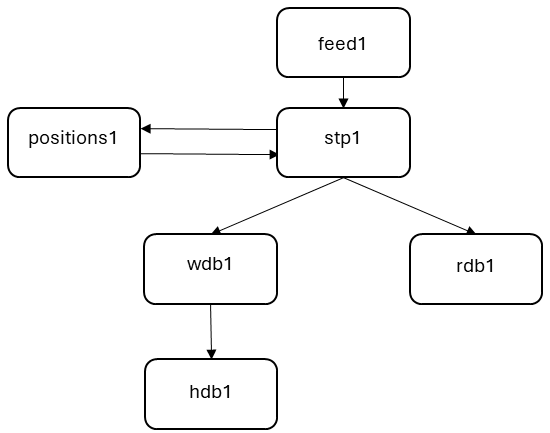
The custom piece was positions1, a new TorQ process that subscribes to the segmented tickerplant for order flow, maintains a running keyed table of net positions per (currency_pair, product, book), and publishes aggregated snapshots back into the STP for the RDB to store. On startup it replays today’s TP log to recover state before accepting live data.
Understanding the Replay Mechanism
Before we critique the output of what was generated, it helps for this particular task to understand how TorQ handles log replay. Claude’s initial approach worked but was unnecessary. Getting it right required reading back through the subscription source code.
Claude’s first instinct was to wire a separate -11! call manually, replay the log explicitly, then subscribe. However, passing replaylog:1b to .sub.subscribe already handles the replay synchronously on the subscriber side.
When .sub.subscribe[`orders;“;0b;1b;first subh] is called with the replay flag, it fetches today’s log file paths from the STP, then calls -11!(msgcount; logfile) locally for each file. This replays the log synchronously by calling the local upd function for each stored message. Live updates only arrive after .sub.subscribe returns, hence there’s no race condition.
subh:.sub.getsubscriptionhandles[`segmentedtickerplant;``;()!()];

/ set flag before subscribing: upd will suppress publishes during replay
.pos.replay:1b;
.sub.subscribe[`orders;``;0b;1b;first subh];   / 1b = replaylog flag; triggers -11! internally
.pos.replay:0b;                                / replay done, resume live publishing
What the replay delivers to upd is raw column vectors (type 0h), not a named table (type 98h). The same function has to handle both formats. Getting the type guards wrong breaks one or the other.
upd:{[t;d]
  if[not t~`orders;:()];

  / replay delivers column vectors (0h); live delivers a table (98h)
  if[0h=type d; d:flip ORDERSCOLS!d];
  if[98h<>type d; :()];

  d:0!select
    delta:sum usd_quantity*-1+2*`long$(side=`BUY),
    basedelta:sum dealt_quantity*-1+2*`long$(side=`BUY),
    baseccy:last dealt_currency
    by currency_pair,product,book
    from d where order_status=`FILLED;

  if[not .pos.replay; publishsnapshot[]; checkalerts[]];
 };
What Claude Got Right
The first pass was better than I expected. The structural scaffolding came out largely correct.
- Startup sequence — .servers.startup[] was executed, followed by .servers.startupdepcycles[], holding until the STP was available
- Keyed position table — composite key (currency_pair, product, book) with float value columns
- Async IPC publishing — neg[h] for non-blocking writes back to the STP on every order tick
- upd function shape — guard by table name, aggregate the batch, call updateposition per key group, then publish
- Breach detection — left-join pattern (0!positions) lj limits on currency_pair
- Alert throttling — lastalert dictionary keyed on (currency_pair, alerttype)
It also picked up TorQ conventions from the source without being prompted, using .sub.subscribe rather than raw .u.sub, process type checks in upd rather than hardcoded table names, and the discovery mechanism for handle resolution. These would normally have required reading the framework source to implement.
What Went Wrong
The framework skeleton held up but problems came at the edges, where the framework’s assumptions about application code only became visible when the process ran.
Log replay failed with a type error
Claude defined a bare global replaying::0b to suppress publishing during TP log replay. The replay would crash with ERR|subscribe|could not replay the log file: type. During replay, upd was reading replaying as :: (the identity function, type 101h) rather than 0b, so not replaying threw a type error. A search through TorQ’s source found no code that sets a bare replaying variable, and the exact trigger remained unclear after investigation.
Fix: rename to .pos.replay (a namespaced variable the framework can’t touch). The exact trigger was never identified, but the rename resolved the crash.
Column mismatch between feed and STP log
The feed was sending 12 columns per order, whereas the ORDERSCOLS definition in positions.q had 13. TorQ’s STP updtab handler prepends a time column when logging, so the stored log has 13 columns, but the live IPC message only carries what the feed sent. The upd function has to handle both formats.
Fix: add type guards: if[0h=type d; d:flip ORDERSCOLS!d] for replay column vectors, if[98h<>type d; :()] to reject anything that isn’t a proper table after that.
Timestamp parsing failed silently
The sample data CSV had timestamps in the format 2024/01/15 09:30:00, which q’s “P”$ cast does not accept directly. Claude’s first attempt at parsing these failed silently (producing null timestamps) rather than erroring.
Fix: explicit conversion via ssr. Swap slashes to dots, the space to D, append nanoseconds, then cast: “P”$ssr[ssr[string x;”/”;”.”];” “;”D”],”.000000000″
.timer.repeat called with wrong argument count
Claude generated a 6-argument call to .timer.repeat, including a mode argument. TorQ v5.2.15 takes 5 arguments with no mode parameter. The process started but the timer silently failed to register.
Fix: remove the mode argument. The correct call is .timer.repeat[start;end;period;func;desc].
Subscription handle captured at the wrong time
Claude initially captured the subscription handle inside a .z.ts callback. .sub.getsubscriptionhandles returns an empty result when called inside a timer callback. It must be called at load time, before the process enters the event loop.
Fix: move subh:.sub.getsubscriptionhandles[…] to load-time code. Store it as a variable and reference it from the startup sequence.
What I Would Have Done Differently
A few things would have changed how I approached this if I were starting again.
Use the torq-developer skill from the start
The previous post in this series, Can Claude Talk TorQ?, published a /torq-developer skill that carries TorQ knowledge as loadable context covering process templates, config patterns, subscription flags and the version-specific details that Claude otherwise has to re-derive from source each session.
Several of the bugs here, including the wrong argument count for .timer.repeat, are version-specific details that the skill is built to cover. I didn’t use it from the start because I wasn’t aware the blog post existed.
Test the recovery path early
Most of the harder bugs only appeared during the startup replay sequence. You couldn’t tell from the static code that the replay delivers data differently from a live subscription. Issues like the column vector mismatch and the incorrect handle capture time don’t show up until you kill the process and restart it. A quick kill-and-restart check at the beginning would have uncovered these issues before they were buried under otherwise working code.
Be more specific about data format transitions upfront
The column-vector vs named-table distinction during replay isn’t apparent from a high-level description, so Claude didn’t account for it. For example, specifying upfront that upd needs to handle both -11! replay format (column vectors, type 0h) and live IPC format (named table, type 98h) would have avoided introducing the column mismatch bug. The more precisely you describe the data contracts at the start, the less time you spend correcting generated code that got the shape wrong.
Takeaways
positions1 ran end-to-end following the build. Live feed data flowed through the STP and positions were observed to be updating in real time. In addition, breach alerts published correctly. The stack even demonstrated sensible behaviour with regards to the recovery from the TP log on restart. The bugs here weren’t the only ones encountered; there were more that didn’t make it into documentation, but none required rethinking the approach.
Looking at the build in full, a few things stand out about where AI assistance saves time and where it doesn’t.
Where it accelerates
One major area in acceleration was observed to be in building the framework scaffolding. Claude read TorQ’s source and applied the conventions correctly, and the scaffolding was solid enough that positions1 was running within the first session, even before the edge cases were worked through. Claude was also able to identify key patterns on startup, implement table definitions and perform process discovery with regards to mapping out how processes communicated with each other.
Where it struggles
A number of issues would have been picked up if the source had been read correctly, including version-specific API signatures and namespace collisions with framework internals. There were also struggles in handling type guarding, such as the case of data format transitions during replay. Claude can help with that, but you still need to verify the output that it produces.
Of particular concern was the introduction of the bare replaying global and the 6-argument timer call. Each passed a review of the generated code, but broke when the process hit the right condition. Recovery paths need to be tested early and should not be assumed to work.
Conclusion
To make best use of Claude, ensure that it is pointed at the source and build iteratively. Take care reviewing each piece before adding the next, and take time in describing any errors that arise. Stepping through a root cause before applying a fix also helped with the build.
Given access to the framework source, Claude produces a solid first draft that follows TorQ conventions correctly. It struggles with version-specific details, which need to be verified against the source.
Claude can help read but can’t replace entirely, which means that while time savings can be observed in setting up the scaffolding, but the debugging takes some of those savings back.
Useful Links
The Claude skill files can be found here. Drop them in ~/.claude/skills/ and type /torq-developer at the start of a session to activate them.
The latest version of TorQ can be found here. It has become a trusted framework leveraged by many institutions globally, and continues to be maintained by our team of developers.
We also maintain the “Finance Starter Pack” that was used as part of this blog, which implements the TorQ framework to provide a working example of a production ready market data capture system. This can be found here.
Share this: