Sean Hehir
Here at Data Intellect we have been putting the latest batch of agentic coding models through their paces. What we’ve found from previous blogs is that, with the right reference sources provided, Claude is capable of solving relatively complex coding problems using q. Not only does it find the right answers, but the code it generates is generally of a high standard to boot.
Unfortunately, in production environments we don’t often get neat Project Euler-style puzzles to solve. A huge amount of development work is spent building and maintaining the infrastructure that underpins the business solutions we deliver to our clients. This can often be messy. kdb+ systems by their nature are often distributed, with dozens or even hundreds of processes talking to each other.
Data Intellect released the TorQ framework several years ago in an effort to help developers streamline this work. It has since become the backbone of kdb+ systems in many institutions. The next logical question was to ask “can Claude talk TorQ?”
I wanted to see how far I could get building a real TorQ process with an AI coding agent and a custom skill file sitting next to me. The idea was to take an existing system (TorQ’s Finance Starter Pack) and add a process to it, similar to what would happen in real life. I settled on adding a surveillance process (surveiller.q) that would plug into the Finance Starter Pack, subscribe to trades, flag price deviations, and publish alerts back through the tickerplant.
This covers a broad checklist of items a kdb+ developer would need to consider when adding a new process to any system:
-
Are new schemas defined and added correctly?
-
Are the right connections made at startup?
-
Is the process extensible?
-
Above all, does the business logic work?
This post isn’t really about the surveiller, which is just a proxy for any new process you might think to add. It’s about evaluating what that skill file does, and doesn’t do, when you point Claude at a TorQ repo.
This post is aimed at kdb+ developers who’ve been watching the AI tooling space from a distance and wondering whether any of it is actually useful for the kind of work we do. TL;DR it is, but you get out what you put in, and a good skill file is what turns the experience from “frustrating” to “genuinely helpful.”
The setup
-
Repo: TorQ Finance Starter Pack (FSP)
-
Agent: Claude Code (VS Code extension)
-
Models: Opus 4.7 for planning, Sonnet 4.6 for execution
-
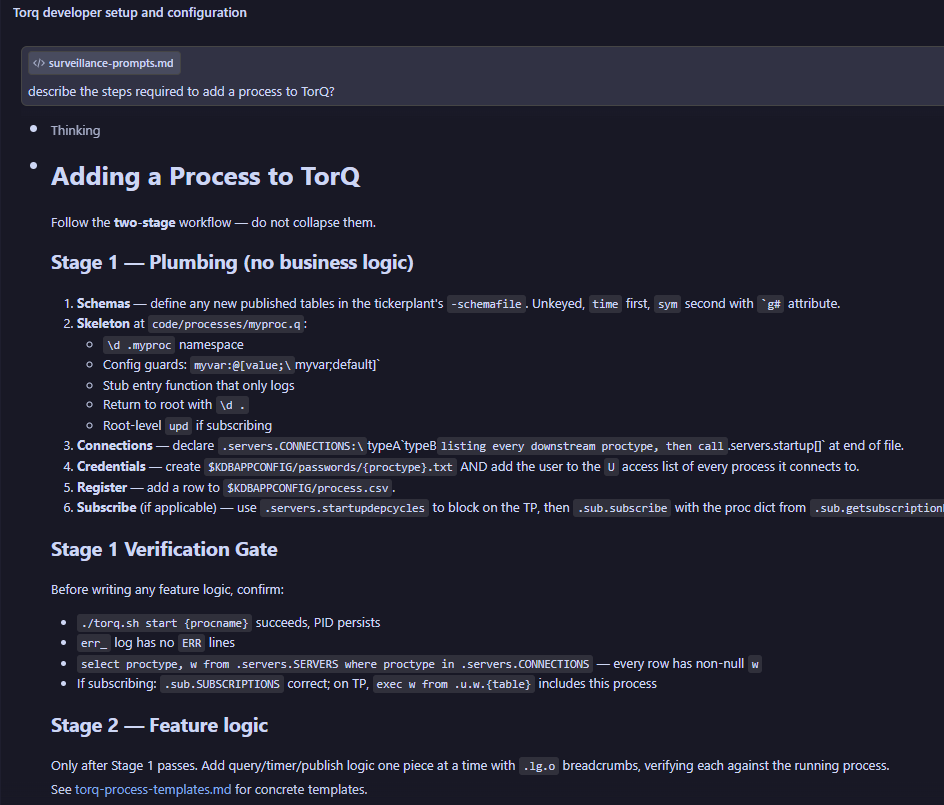
Skill file: a
torq-developerSKILL.md file -
Reference files: files the
torq-developerskill loads situationally
Why a skill file matters
Out of the box, Claude has a pretty good understanding of kdb+. There’s enough documentation on the web – from KX white papers, to open source github projects, to our own DI blogs – to provide a strong training ground and with this information Claude can pretty quickly put together some relatively complex q scripts and get them (mostly) right first time.
When it comes to TorQ however, there is a good deal less information available for Claude to prime itself with. Without multiple sources of documentation outside of DI’s own TorQ docs, there really isn’t enough information to positively reinforce the key elements of the framework. When pointed at a TorQ codebase and asked to contribute changes to it, Claude will spin its wheels as it tries to come up to speed with the framework each time you start a new session.
This way, you end up paying for the knowledge-gap with your own time. You re-explain conventions in every prompt. You catch the agent writing plain-q helpers when the framework already provides them. You get working code that nobody on the team would sign off on because it ignores half the patterns the rest of the codebase relies on.
The skill file is where you front-load that knowledge. Ours covers:
-
The directory structure (
code/processes/,code/{proctype}/,appconfig/) -
How settings files work and the
.proc.loadprocesscodeflag -
The guard pattern for config defaults (
@[value;\\foo;default]`) -
TorQ’s API registration (
.api.add) -
Timer registration and the T3 error-trap idiom
-
Server discovery and handle caching
In addition we have provided several reference files which are not auto-loaded but read in when the task matches their contents. These are:
torq-internals.md: A breakdown of the inner workings of torq.q
torq-patterns.md: common coding patterns found in existing torq code files
torq-process-templates.md: process templates using existing torq processes
q-language-reference.md: a brief general overview of the q language
kdb-ecosystem.md: an overview of various language’s interfaces for kdb+ (useful if adding feeds etc.)
Opus to plan, Sonnet to build
This split was planned deliberately. A great feature of the conciseness of kdb+ is the ability to iterate ideas very quickly in the development phase. Opus, on the other hand, is fantastic at in-depth thinking but the trade off for this is high token spend and a delay in feedback while Claude examines different possibilities.
The hypothesis here was that if we leveraged Opus to generate a really good spec and set of prompts using the torq-developer skill, we could then use Sonnet to more quickly generate the initial draft of the code, and even more quickly iterate through any issues that cropped up.
In hindsight I think this was still the right approach to take for this project but YMMV. For more complex tasks involving difficult business or application logic with more gotchas hiding in the woodwork, it may be worthwhile to shift more effort onto Opus, maybe reserving Sonnet for quicker debugging sessions.
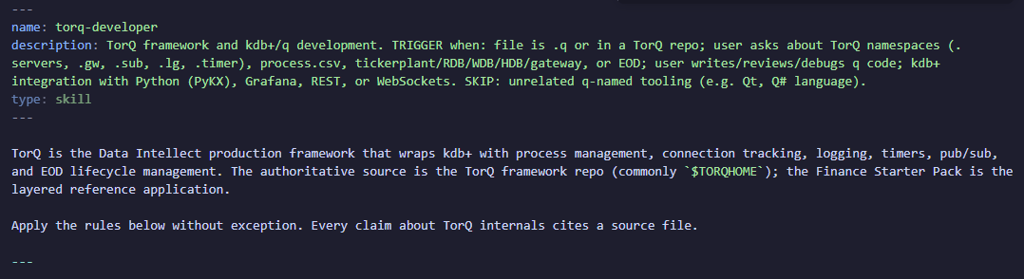
The two artifacts that came out of the Opus phase were surveillance-spec.md (what we’re building) and surveillance-prompts.md (a sequence of prompts to feed to Sonnet).
Why four prompts, not one?
The knee-jerk thing to do is write one enormous prompt: “build me a surveiller that does X, Y, and Z.” The problem with this approach is that Claude will disappear for several minutes, engineer a solution that involves changes in several locations, and return what, in its mind, is a finished product. The catch is that we don’t have a window into any of the assumptions it made along the way until it hands the whole thing back. We’re then left with several hundred lines to comprehend, test, and bug-fix at once. Not ideal, and not how developers tend to work in real life.
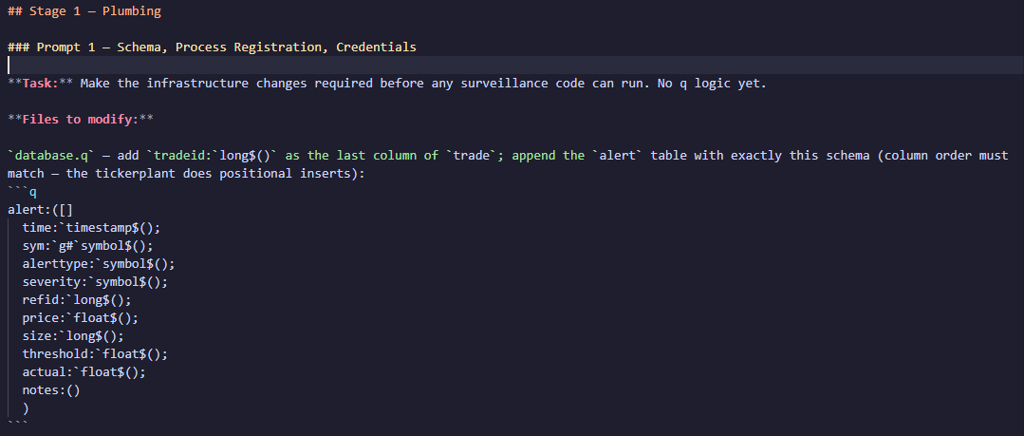
We pointed Opus at the spec we generated and asked it to help design four prompts that would cover the main stages of development of our process:
-
Infrastructure:
database.qschema additions, theprocess.csvrow, password files -
Scaffold: the config file, the main
-loadfile, handle caching, a stub detect function on a timer -
Detection logic: the real
pricedeviation.qundercode/surveiller/ -
Feed modifications: adding trade IDs to the feed and injecting price anomalies for testing
Each prompt produces something runnable. After prompt 2 the surveiller starts, connects to everything, and fires a timer that logs “stub”- that’s something I can manually verify. If prompt 2 had a subtle bug find out now, not three prompts later when it’s tangled up with detection logic and feed changes.
The other thing incremental prompts buy you: the agent doesn’t have to hold the whole design in its head at once. Each prompt is scoped. The spec tells it what the shape of the output should look like. The skill tells it what conventions to follow. The previous prompts have already established the files it’s editing, meaning there’s less room for the agent to drift.
What went well
Architecture came out right. The agent put the config in appconfig/settings/surveiller.q, the main entry in code/processes/surveiller.q, the detection logic in code/surveiller/pricedeviation.q. Namespaces were sensible (.surv, .surv.cfg, .surv.pxdev). Handles were cached via helper functions rather than bare globals.
TorQ conventions were respected. Guard pattern on every config default. T3 error trap around the timer callback so a detection error doesn’t pull the timer out of the schedule. .api.add for every public function. .lg.o / .lg.w / .lg.e instead of -1 or 0N!.
The overall shape was correct first time. I didn’t have to tell the agent to move files around, restructure namespaces, or rewrite large sections. The scaffolding dropped into place and the detection logic fit cleanly into it.
After a single iteration through the prompts I was left with a very respectable result. In 15 minutes all the files were where they should be and they contained, for the most part, what looked like serviceable code.
The next thing to do was boot it up, revel in my success, and… oh, there’s a 'type error.
Stubbing Our Toes
Loading order. The prompts were engineered such that we would first get a running skeleton of the process put together so we could verify connections, config etc. And we could then implement business logic in the next prompt. Between prompts the agent put a stub pxdev.detect in the main surveiller.q file. It then subsequently added the real implementation in code/surveiller/pricedeviation.q when we moved to prompt 3. Perfectly reasonable except that in TorQ the -load file runs after the auto-loaded proctype code. So the stub ended up overwriting the real function, and the timer kept calling the stub.
The agent didn’t know about this loading order, and my skill file didn’t mention it. First workflow improvement identified.
Silent data loss at the tickerplant. The alert schema starts with time. The agent dutifully included a time value in the published row. The STP then prepends its own time column on every .u.upd, the row ends up one column too wide, and the data is silently dropped before it reaches the RDB. The surveiller was happily logging “published 60 alert(s)” while the RDB stayed empty. If you’ve worked with a TorQ tickerplant you know this; if you haven’t, you don’t.
q-specific foot-guns. The agent wrote update dev:... from joined, which errors with 'assign because dev is a built-in (standard deviation). Elsewhere it got tangled trying to reference a root-level variable from inside a \\d .feed.anom block. This is a corner of q’s lookup semantics that’s easy to get wrong and hard to spot in review. Both are the kind of thing a developer with a few months of q picks up by osmosis; the agent hasn’t.
Design judgement. Once everything was running, the surveiller generated hundreds of duplicate alerts. The agent’s first attempt to fix this was maintaining an in-memory set of trade IDs it had already published. This was fine until the process restarts, at which point every alert fires again. Eventually I was able to ask it to query the RDB instead for a list of published alerts, which prevented this.
None of these were fatal. I was able to fix each in a prompt or two once the symptom was visible. But they stack up, and they’re exactly the sort of thing a skill file can’t reasonably encode ahead of time. You’d need a list of every reserved word, every silent-drop behaviour of every TorQ process, every quirk of namespace lookup. Which is a big part of what pushed me toward the “verification over prevention” thinking in the next section.
What this would have looked like without the skill
I tried a comparison pass by writing a single prompt with no skill loaded, just “build me a TorQ surveillance process.” The output was definitely q code. It was also recognisably not TorQ: no .lg logging, no .api.add, no settings file, no timer through .timer.repeat, no .servers for discovery. Globals everywhere. Hardcoded ports. The kind of script you’d write in a tutorial, not the kind of code you’d merge.
With the skill, the framework-shaped parts of the output are almost free. You pay attention to the domain logic, the agent handles the boilerplate.
Takeaways
-
With a well-designed skill file Claude can add relatively complex components to a system in minutes. This removes a massive amount of boilerplate work from developers’ shoulders.
-
Claude will still make mistakes. With a skill file these will end up being less frequent but often more subtle than if we had just pointed an unprepped Claude at the problem.
-
Claude is excellent at adding fresh components, but relatively poor at future-proofing and maintaining what is already there.
Final Thoughts and Recommendations
A skill file raises Claude’s ceiling on TorQ dramatically but it doesn’t eliminate mistakes, it shifts them. Junior-level slips become deeper, subtler issues that take real thought to diagnose, and Claude itself tends to tie itself in knots rather than reason its way through them. The fix isn’t to pour every edge case into the skill: a bloated skill file drowns out the rules that actually matter. It’s a balancing act.
In my view the following steps should be followed when working with Claude to add functionality to a system:
-
Define a solid skill file as your starting point. Use the existing TorQ skill or define your own for your own project.
-
Keep the core file as light as possible. Reference supplementary files as required.
-
Rather than defining dozens of rules, provide at least one detailed sample process template as part of the skill. A picture speaks a thousand words after all.
-
-
Work in stages. This way the real development work will shift from coding to working with Claude to build a spec and set of prompts to get as much of the task completed up front as possible.
-
Verify, verify, verify. If Claude generates a code file, perform at least a cursory review of it, if not outright running it. It’s easy to turn autopilot on with ‘Accept all edits’ but if mistakes are caught at the implementation stage it’s a much quicker process than trying to use Claude to debug them after the fact.
-
Accept that there will be issues. Claude simply doesn’t have the library of training data for kdb+ that it has for more mainstream languages, and no skill file can fix that. To say Claude can get the bones of a system in place is a massive understatement (it gets a lot of the connective tissue in place too) but, right now, it needs a hand to get the finished product over the line.
Will I be using this again?
Yes.
The agent got a surveillance process running end-to-end. Schema changes, process registration, config file, scaffolding, real detection logic, feed anomaly injection for testing. This was all accomplished in a handful of prompts, and all the code is in the style and shape the rest of the repo uses. Even with bugs this was a huge productivity lift.
However I did spend meaningful time debugging subtleties the agent couldn’t be expected to know. The right preparation (a skill file with more of the gotchas baked in, a spec, a prompt sequence, Opus in the loop at key decision points) would definitely mitigate this.
If you’re a kdb+ developer who’s been curious about this, my suggestion is: don’t start by asking an agent to build something for you. Start by writing a skill file for the framework you use every day. Think of the skill file as a summary of your own expertise: it’s the thing that makes the agent actually useful instead of a generator of plausible-looking kdb+ that doesn’t fit your codebase.
Give it a try
The skill files are available in the main TorQ repo here.
The skill, and associated files, can be simply dropped into a ~/.claude/skills folder and activated by typing /torq-developer into a Claude session.
Share this: